Home
Home is the first page you see when you open Quest Portal on the web. It gathers what is happening at your tables in one feed: the things that are waiting on you, the latest from your campaigns, and news from Quest Portal.
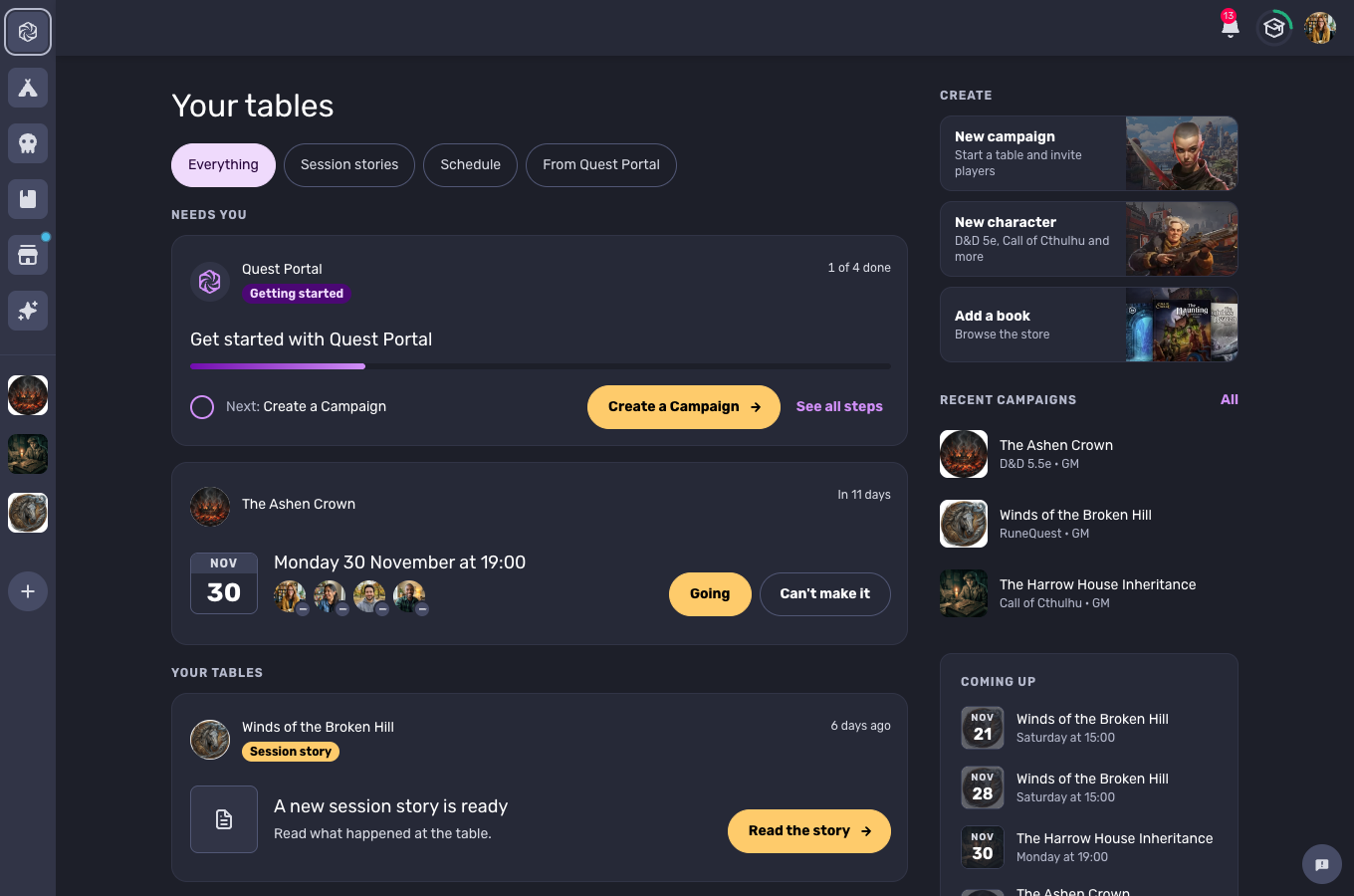
The feed
The feed is the main column of Home. It has four parts, from top to bottom.
Needs you
Things that are waiting for an answer from you. This part is hidden when nothing is waiting.
Getting started. New accounts see the Checklist here until every step is done.
Sessions you have not answered. When a session is scheduled in one of your campaigns, its card shows the date, who is coming, and two buttons: Going and Can't make it. Answer right on the card. See Session Scheduling.
Your plan. A card shows when your plan needs your attention, for example while a free trial is running or after it has ended. See Plans and Billing.
Your tables
The latest from your campaigns, one card for each campaign and up to three cards in all. A card can tell you that:
a session is in progress, with a button to join it
a new session story is ready to read
a session was played
a new player joined
New in Quest Portal
The most recent changelog posts. Press Read more to open one, or Changelog to see them all.
Roadmap
What we shipped, what we are building and what comes next. You can also vote on the ideas we are considering. See Roadmap.
Filters
The buttons under the heading narrow the feed to one kind of card.
Filter | Shows |
|---|---|
Everything | The whole feed. |
Session stories | Only session stories. This filter appears once one of your campaigns has a story. |
Schedule | Coming sessions in your campaigns and your answer to each. |
From Quest Portal | Changelog posts and the roadmap. |
When a filter has nothing to show yet, Home explains how the feature works and gives you a button for the next step, such as Create a campaign.
Beside the feed
Create. Shortcuts for a new campaign, a new character, and adding a book from the store.
Recent campaigns. The campaigns you opened most recently, with the game system and whether you are the GM or a player. Press All to see every campaign.
Coming up. The next scheduled sessions across all your campaigns.
On a narrow window or a phone browser, Create and Recent campaigns move above the feed and Coming up follows it.
Creating without a plan
Creating a campaign or a character needs a free trial or a plan. If your account has neither, the Create shortcuts open a dialog where you can start your free 30-day trial or pick a plan. Players can always join a campaign that someone else's plan covers. See Do my players need a plan?