
Quest Portal
Nov 4, 2026 · 1 min read
New: An Initiative Tracker for Online Combat
Run combat turn by turn, right next to your scenes. Quest Portal now keeps the turn order for you, shows whose turn it is and which round you're on, and your players follow along live.
Who can use it: everyone in a campaign, on the web and in version 10.0.0 of the iOS and Android apps. The GM plans and runs encounters; players see the running encounter in the session's Combat tab. It works in any campaign covered by Core or Pro, or a trial.
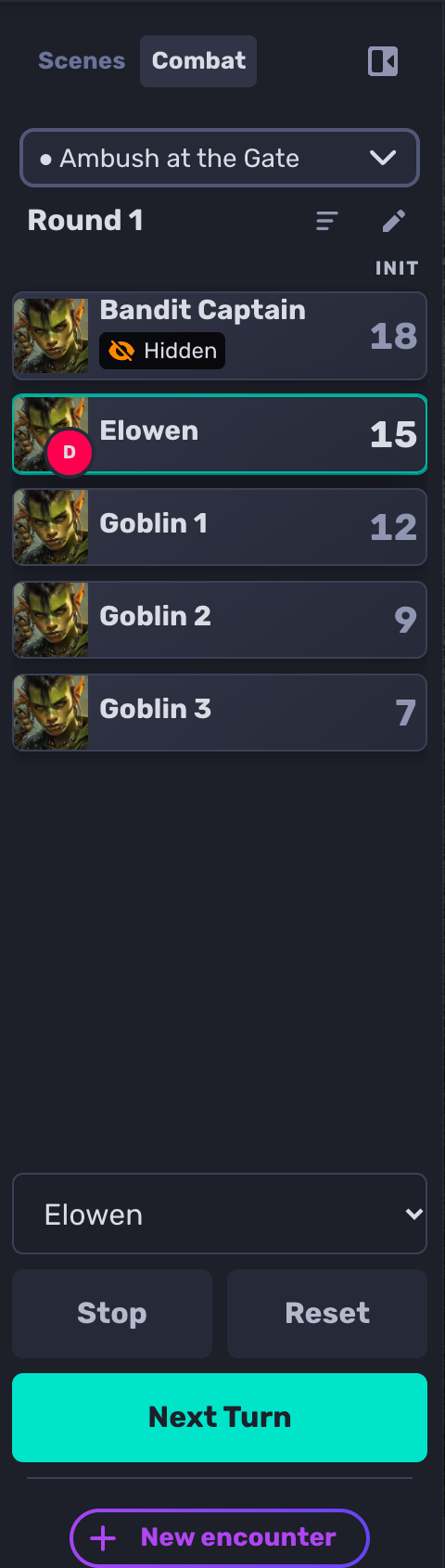
How it works
In a session, open the scene deck, choose the Combat tab and choose New encounter.
Add the characters in the fight and type in their initiative.
Choose Start, then Next Turn as the fight moves on.
Plan fights ahead of time in the new Encounters section of Notes, and hide an ambush by hiding the NPC: players never see hidden characters, not even how many there are.
Learn more: Initiative Tracker in the documentation, and the guide: How to Run Combat with an Initiative Tracker in a Virtual Tabletop.
More fun at the table, less fuss around it
The tavern falls quiet. You spent all week on this villain: the scarred voice, the secret letter, the slow reveal in the final act. Your players have other plans. They have just set fire to the only bridge out of town, the paladin is deep in an argument with a goat, and the rogue has quietly pocketed the letter that was supposed to unravel everything. Somewhere across the river, your villain stands alone in the rain, waiting for an entrance that will never come. The bard leans back, grinning. Four faces turn to you.
What do
you do?